
My Jenkins controller runs on my LAN with no public IP. I wanted a build agent that runs in Azure – close to the resources it builds, and able to authenticate to Azure as a managed identity instead of carrying a service-principal secret. The problem: an agent in Azure cannot reach a controller on my LAN, and I did not want to expose Jenkins to the internet, punch an inbound hole in my firewall, or stand up a VPN just for a build agent.
Azure Relay solves exactly this. It is a managed service whose whole job is to let two parties that both sit behind NAT reach each other by each making an outbound connection to a rendezvous point in Azure. Pair it with azbridge (the Azure Relay Bridge – it turns a relay hybrid connection into a plain TCP tunnel) and the Jenkins agent connection rides over the relay. No public Jenkins, no inbound firewall change, no VPN.
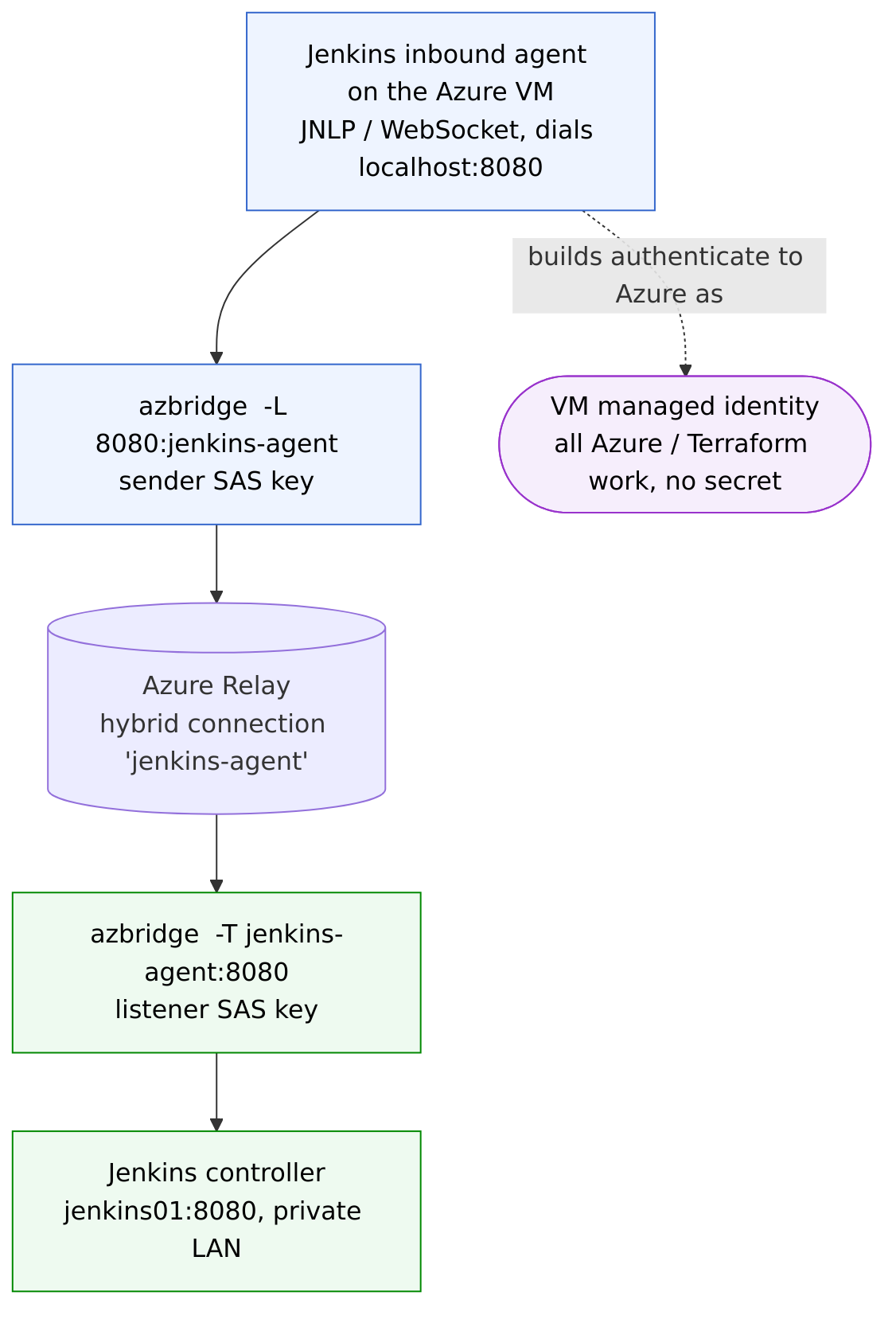
How the tunnel is built
One hybrid connection named jenkins-agent on a Relay namespace, with two SAS keys: a listener key for the controller side and a sender key for the agent side. Each side runs one azbridge process, the same way you would use ssh -L / -R:
# On the LAN Jenkins controller - publish port 8080 onto the relay (listener)
azbridge -T jenkins-agent:8080 -x "$LISTENER_SAS"

# On the Azure VM agent - bind localhost:8080 to the relay (sender)
azbridge -L 8080:jenkins-agent -x "$SENDER_SAS"
Now the agent’s localhost:8080 is the controller’s 8080, tunnelled over the relay. Both azbridge processes made outbound connections to Azure; neither side is listening for the internet.
Attaching the agent
With the tunnel up, this is just an ordinary Jenkins inbound (JNLP over WebSocket) agent pointed at the tunnel:
java -jar agent.jar -url http://localhost:8080/ -name azure-agent -secret "$AGENT_SECRET" -webSocket -workDir /home/jenkins/agent
Two gotchas worth recording. First, a modern Jenkins controller ships remoting compiled for Java 21; an agent on Java 17 fails with UnsupportedClassVersionError class 65.0 vs 61.0. Second, run both the azbridge tunnel and the agent as systemd services with Restart=always, and order the agent unit After=azbridge.service – otherwise a reboot leaves you with an agent that starts before its tunnel exists. Keep the SAS strings and the agent secret in root-only environment files, out of the unit files.
What is and is not credential-free
The reason to put the agent in Azure at all is that the builds authenticate to Azure as the VM’s managed identity – Terraform and the az CLI just work, with no service principal and no client secret anywhere on the runner. That is the part that matters: the thing doing real work in your subscription holds no long-lived Azure credential.
Being honest about the plumbing, though: the relay tunnel still uses the two SAS keys, and the agent still uses its JNLP secret. So the accurate claim is “no Azure credentials on the runner,” not “no credentials at all.” Azure Relay does support Azure AD / RBAC auth in place of SAS, which would let the tunnel use the same managed identity – a worthwhile next step to close that gap.
Why this shape
The controller stays private. The firewall stays closed inbound. There is no VPN to operate. The agent runs next to the resources it manages, holds an identity rather than a secret, and the relay hybrid connection itself is a few lines of Terraform. For a build agent that has to live in a different network than its controller, it is a lot less machinery than the alternatives.
Leave a Reply