
I have been doing endpoint management for a long time. I started on SMS 2.0 – Microsoft Systems Management Server – back when there were rumors the product was going to be cancelled and it was not clear it would survive. It did. It became SCCM, then Configuration Manager, and a good chunk of this blog from 2010 to 2015 is me working through that era: OSD task sequences, building WinPE boot images, driver packages, collections and advertisements, the trickle install, TSConfig.INI, and running a task sequence after OSD. Then I moved on to other things and have not touched endpoint deployment in a while.
I wanted to catch up – to see how the new technology actually works now, not just read about it. So I rebuilt Windows 11 bare-metal in a dev environment from scratch, on purpose without a management server, to find out which parts have changed and which are exactly the same. This time I took it all the way: bare metal to a managed, Entra-joined machine with its apps installed.
What I built
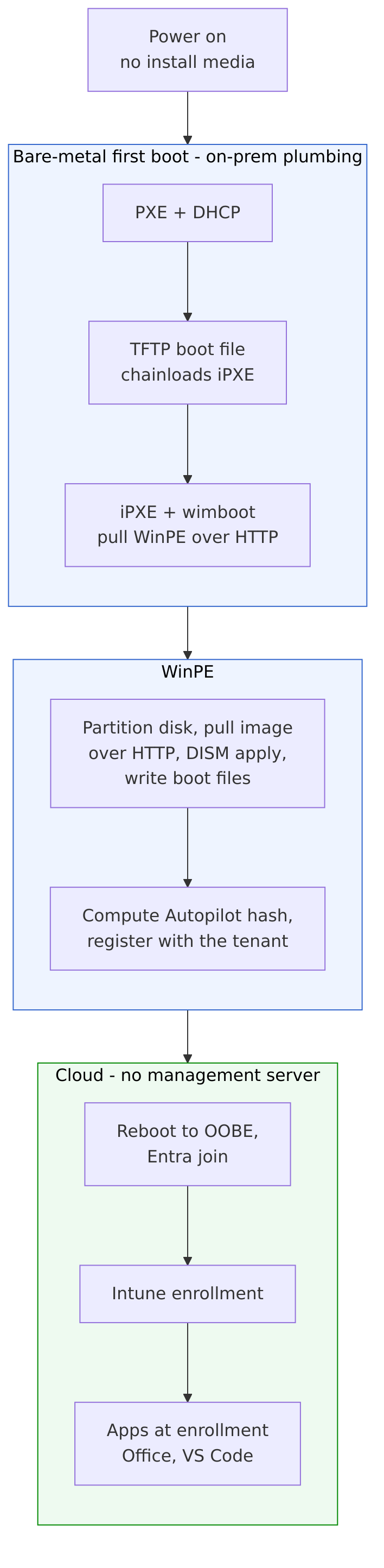
A Windows 11 machine that PXE-boots with no install media attached and provisions itself end to end. The chain: PXE and DHCP hand the machine a boot file over TFTP; that chainloads iPXE, which uses wimboot to pull WinPE over HTTP; WinPE partitions the disk, pulls the Windows image over HTTP, applies it with DISM, writes the boot files – and, before it reboots, computes the machine’s Autopilot hardware hash and registers it with the tenant itself. The machine then reboots into the out-of-box experience, joins Entra, enrolls in Intune, and installs its apps. No distribution point, no site server, no client agent, and no one collecting a hardware hash by hand.
The old-to-new mapping
This is the part I actually wanted to see, and most of the pieces I knew are still here – they just moved. The OSD task sequence became a WinPE script doing a DISM apply, or, for the cloud path, Autopilot; the task sequence engine is gone and what is left is the primitives it was wrapping. The boot image I used to build inside Configuration Manager is still WinPE, still a boot.wim, but now I serve it over HTTP with wimboot instead of staging it on a distribution point – the same idea as my old WinPE wim/ISO post, fifteen years on. Driver injection is still a real problem: I hit the modern version of my own drivers-missing post when WinPE could not see the disk because the virtual SCSI controller had no inbox driver. The rest mostly maps one to one:
| Configuration Manager | Modern equivalent |
|---|---|
| Domain join and client push | Entra join, Autopilot, Intune |
| Group Policy | Intune configuration profiles |
| WSUS and the software update point | Windows Update for Business and update rings |
| Collections and advertisements | Intune groups and policies |
| Software distribution | Intune apps delivered at enrollment |
Apps moved out of the image
This was the biggest practical change. In the SCCM days I either baked applications into the image – the thick image – or laid them down in the task sequence. Now the image is just the operating system. Intune installs the applications after the machine enrolls: I deployed Office and Visual Studio Code, and the Enrollment Status Page holds the desktop until the required apps finish, which is the closest modern thing to a task sequence installing software before handing the machine over. One snag worth recording: the tenant did not have the Microsoft Store integration turned on, so Visual Studio Code could not go in as a Store app. It had to be a Win32 app, which meant building the .intunewin package and its encrypted upload myself instead of using the packaging tool. The primitives are still here, you just assemble them.
What is the same, and what is not
The same: under everything, bare-metal first boot is still DHCP, TFTP, and WinPE. If you want a machine to image itself from power-on, you are still standing up the same plumbing I was standing up in 2010. That surprised me – I expected the cloud to have absorbed more of it. I even had to add PowerShell to the WinPE boot image to make the registration call, the same optional-component surgery I did on boot images years ago.
What is not: the server in the middle is gone. SMS and then SCCM were one big box that did imaging, software, updates, inventory, and reporting. The modern version is disaggregated – PXE and WinPE for first boot, Autopilot for provisioning, Intune for management – and most of it is cloud-side. You assemble it from parts instead of installing one product, and you still need something to orchestrate the parts; mine is a CI pipeline. The other shift is identity: a device used to be identified after the fact by a client push, and now it is identified up front by a hardware hash you register before it ever boots. BIOS and MBR also gave way to UEFI, GPT, and a TPM, which Autopilot requires, and that bit me with a boot-loader detail that did not exist in the BIOS world.
Where I landed
It works end to end – power-on to a managed, Entra-joined Windows 11 machine with Office and VS Code installed, no management server in the path. The only manual step left is a single sign-in at the out-of-box experience with a work account; that is user-driven Autopilot. Self-deploying mode removes even that, but it needs a real, attestable TPM, which my virtual machine does not have – on physical hardware it would. Coming back to this after a decade, the surprise was not how much changed but how much did not: it is still WinPE and a boot.wim and DISM at the bottom, with the one big server in the middle replaced by a handful of cloud services you wire together yourself.
Leave a Reply