
I wanted to remove a mailto and leave just the email address:
$('a[href^="mailto:"]').contents().unwrap();
I wanted to remove a mailto and leave just the email address:
$('a[href^="mailto:"]').contents().unwrap();
Been working with @xrobx99 on this one. We had a request for TweetDeck to be installed on a couple of user’s machines. We feared that word would get out and everyone would have to have it. So we have been looking into deploying TweeDeck silently through SCCM. Using my SCCM PowerShell install script (which is basically just a wrapper for the msi commands) we have observerd the following issues below:
When run silently with the command: msiexec /i TweetDeck.msi /q /norestart /l c:\Temp\TweetDeck.log
Other Non-enterprise ready issues that we have observed:
It is entirely possible that I am doing something wrong, but those are my findings.
UPDATE I realized that I can use the ALLUSERS=1 parameter and the program will be installed for all users, then the Icons and Add remove programs will be correct. Maybe the packagers need to include ALLUSERS=1 in their packaging software? Updated install string:
msiexec /i TweetDeck.msi ALLUSERS=1 /q /norestart /l c:\Temp\TweetDeck.log
I can never remember this. More of a note to myself. I just got the new iPad (thanks wife!) and when I added my google apps account as an Exchange server, my delegate calendars did not show (for example, the shared family calendar).
All I needed to do was to visit m.google.com/sync from the iPad, log in, and I can select what calendars my device sees.
I have worked on Solaris and RedHat/CentOS (although Solaris was many years ago, so I should just admit that I no longer know where anything is). I find Debian to be a different dialect than RedHat. This post is going to serve as my translation cheat sheet.
complete -W "$(sed -e 's/^ *//' -e '/^#/d' -e 's/[, ].*//' -e '/\[/d' ~/.ssh/known_hosts | sort -u)" ssh ping
I am constantly having to look this up. What is a vBulletin’s form’s rss feed?
http://www.myforum.com/external.php?type=rss&forumids=1
Obviously the admin has to enable it. Have not tested against all versions
I was away on vacation, and a dev box ran out of space. Once I got back, I cleaned it up, rebooted and still could not connect to it. @xrobx99 noticed an IPSec message in the event logs:
The IPSec driver has entered Block mode. IPSec will discard all inbound and outbound TCP/IP network traffic that is not permitted by boot-time IPSec Policy exemptions.
We thought that was suspect as we weren’t using IPSec policies. It seems that our server ran out of space and the IPSec policy became corrupted.
I ran the command :
regsvr32 polstore.dll
This command rebuilds the local policy store. I rebooted and all was fine.
Hope that helps someone.
As I said in this post, there are plenty of articles on how to do this. This is more of a note for myself, as I have to “re-learn” this every time I need to customize SharePoint.
There are 2 ways (that I know of) that you can add code to every page in SharePoint 2010, 1 by the AdditionalPageHead delegate control, or ,2 by Custom Action. This article is about #1 (see #2 here) using the AdditionalPageHead delegate control.
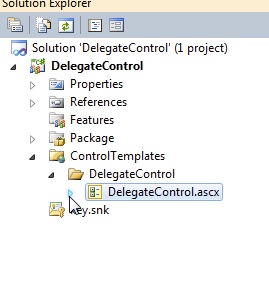
<script type="text/javascript" src="/path/to/jquery.js"></script>
  <Control Id="AdditionalPageHead"
          Sequence="90"
          ControlSrc="~/_CONTROLTEMPLATES/DelegateControl/DelegateControl.ascx" />
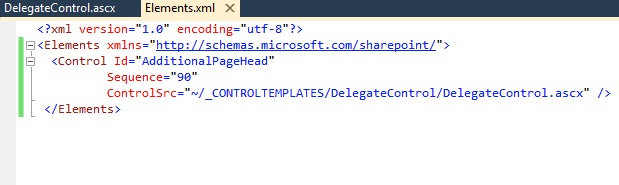
Package everything up and you will now see your reference to jQuery on the top of all pages.
This is a reminder to my self that this blog post has the solutoin to the “b” error when working with the Client Object Model. Basically I need to change this:
createDelegate(this, this.onSuccessMethod)
to this:
createDelegate(this, onSuccessMethod)