• 2013 Year in review & Goals for 2014

    My blogging fell apart in 2013. I was doing well and reached a goal of 10,000 visitors in a month. Then it fell apart. I spent a lot of time trying to learn Cisco products, and I felt that I did to have anything interesting to add to the internets – it was stuff that all Cisco people already know.

    And, I got lazy.

    Goals for 2014:
    My goals for this year are about the same: 8 posts per month (two per week). I also want to get my Microsoft Certification updated to the new MCSE track.

    Anyway, here are my visits for the year:

    December      4034
    November      4424
    October       4964
    September     4600
    August        5106
    July          5502
    June          5934
    May           7409
    April         10913
    March         11440
    February      10312
    January       11256
    

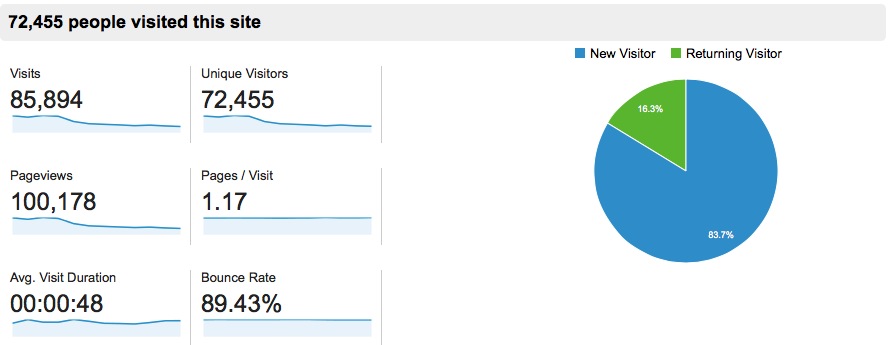
    And my Summary:
    2013

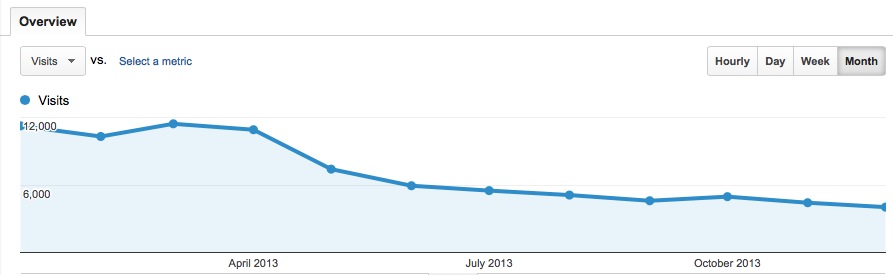
    And my downwards traffic trend:
    Screen Shot 2014-01-14 at 10.29.22 AM


  • How to recursively find all files in OS X Finder

    I often want to find all files in a folder and all sub folders. I can never remember this:
    -kind:folder

    Seems backwards to me, but it works.


  • Quick PowerShell script to check DNS settings on all servers

    I wanted to decommission some old Domain Controllers. I needed to make sure that other servers weren’t pointing to theses old DCs for DNS. I wrote this quick PowerShell script to loop through all servers and get their DNS search order.

    $AllServers=Get-ADComputer -Filter {OperatingSystem -Like "Windows Server*"}
    ForEach ($Server in $AllServers){
    $Result=Get-WmiObject -Class Win32_NetworkAdapterConfiguration -Filter "IPEnabled = 'True'" -Property DNSServerSearchOrder -ComputerName $Server.Name 
    $output = new-object PSObject 
    $output | add-member NoteProperty "ComputerName" $Server.Name
    $output | add-member NoteProperty "DNSServerSearchOrder" $Result.DNSServerSearchOrder
    $output
    }
    

    Hope that helps some one, or me when we moce to the next version of DCs.


  • Command to show all MySQL databases and their sizes

    I found this MySQL query to list all DBs and their sizes here. I wanted to blog it, so it is easier for me to find.

    mysql -e 'SELECT table_schema AS "Database name", SUM(data_length + index_length) / 1024 / 1024 AS "Size (MB)" FROM information_schema.TABLES GROUP BY table_schema;'
    

  • mysql command to show a table’s column names <- Why can't i remember this?

    It is easy enough. Why can’t I remember this -> show columns from table name;


  • Just learned about /etc/resolver in OSX/BSD

    I just learned that OSX/BSD has “conditional DNS” built into the os! Thanks to this post.

    I wish I knew about this earlier! AND I wish the same thing existed for Windows machines!


  • Quick PowerShell script to “tail -f” dhcp logs

    When I am working in Linux, I like to leave a log open with “tail -f”, so I can see the results of some test I am performing.

    The other day I wanted to see when a new machine joined the network, so I could give it a static DHCP lease. Usually I connect to the DHCP server find the DHCP logs and open them in notepad. I finally wrote a quick script to “tail -f dhcp.log” in PowerShell.


    function JBM-AD-GetDHCPLogs {
     PARAM($ServerName="dhcpServerName")
     $FileName="DhcpSrvLog-$(get-date -format ddd).log"
     $PATH="\\$ServerName\c$\Windows\System32\dhcp\$FileName"
     Get-Content $path –Wait
     }
    

  • ACLs for Azure end points!!

    sweet. Have they always been there?