• PowerShell scripts to create a WinPE 4.0 wim/ISO

    I have been  a WinPE hacker since it was only available to SA subscribers. With Vista it was free to the world, and I started moving all my setup processes to it. I have always used the dos batch scripts found in this forum to create a new WinPE ISO. Since WinPE 4.0 is coming out with Windows 8 (if not before (I don’t know timelines)), I wanted to modify the dos batch files I rely on to work with WinPE 4.0. Since WinPE 4.0 has PowerShell in it, I wanted to migrate those dos batch files to PowerShell functions. Working from the dos batch files linked above and this post I created the functions below. They have numbers in their names because they are the steps to follow when creating a new ISO.

    
    Function JBMURPHY-WinPE-1MakePEDirectory{
    	Param($OSArchitecture="x86")
    
     remove-item -force "c:\PE\winpe_$OSArchitecture"
     New-Item c:\PE\winpe_$OSArchitecture\ISO\sources -type directory -force
     New-Item c:\PE\winpe_$OSArchitecture\mount -type directory -force
     copy-item "C:\Program Files\Windows Kits\8.0\Assessment and Deployment Kit\Windows Preinstallation Environment\$OSArchitecture\winpe.wim" "c:\PE\winpe_$OSArchitecture\ISO\sources\boot.wim"
     copy-item "C:\Program Files\Windows Kits\8.0\Assessment and Deployment Kit\Windows Preinstallation Environment\$OSArchitecture\Media\*" "c:\PE\winpe_$OSArchitecture\ISO\" -recurse
     copy-item "C:\Program Files\Windows Kits\8.0\Assessment and Deployment Kit\Deployment and Imaging Tools\$OSArchitecture\Oscdimg\etfsboot.com" "c:\PE\winpe_$OSArchitecture\"
    
    }
    
    Function JBMURPHY-WinPE-2Mount{
    	Param($OSArchitecture="x86",$WimFile="c:\PE\winpe_$OSArchitecture\ISO\sources\boot.wim")
    	DISM.exe /Mount-Wim /WimFile:$WimFile /index:1 /MountDir:C:\PE\winpe_$OSArchitecture\mount
    }
    
    Function JBMURPHY-WinPE-3.0AddPAckages{
    	Param($OSArchitecture="x86",$WimFile="c:\PE\winpe_$OSArchitecture\ISO\sources\boot.wim")
    	$OCsPATH="C:\Program Files\Windows Kits\8.0\Assessment and Deployment Kit\Windows Preinstallation Environment\$OSArchitecture\WinPE_OCs"
    	dism /image:C:\PE\winpe_$OSArchitecture\mount /add-package /packagepath:"$OCsPATH\WinPE-Scripting.cab"
    	dism /image:C:\PE\winpe_$OSArchitecture\mount /add-package /packagepath:"$OCsPATH\en-us\WinPE-Scripting_en-us.cab"
    	dism /image:C:\PE\winpe_$OSArchitecture\mount /add-package /packagepath:"$OCsPATH\WinPE-WMI.cab"
    	dism /image:C:\PE\winpe_$OSArchitecture\mount /add-package /packagepath:"$OCsPATH\en-us\WinPE-WMI_en-us.cab"
    	dism /image:C:\PE\winpe_$OSArchitecture\mount /add-package /packagepath:"$OCsPATH\WinPE-MDAC.cab"
    	dism /image:C:\PE\winpe_$OSArchitecture\mount /add-package /packagepath:"$OCsPATH\en-us\WinPE-MDAC_en-us.cab"
    	dism /image:C:\PE\winpe_$OSArchitecture\mount /add-package /packagepath:"$OCsPATH\WinPE-HTA.cab"
    	dism /image:C:\PE\winpe_$OSArchitecture\mount /add-package /packagepath:"$OCsPATH\en-us\WinPE-HTA_en-us.cab"
    	dism /image:C:\PE\winpe_$OSArchitecture\mount /add-package /packagepath:"$OCsPATH\WinPE-NetFx4.cab"
    	dism /image:C:\PE\winpe_$OSArchitecture\mount /add-package /packagepath:"$OCsPATH\en-us\WinPE-NetFx4_en-us.cab"
    	dism /image:C:\PE\winpe_$OSArchitecture\mount /add-package /packagepath:"$OCsPATH\WinPE-PowerShell3.cab"
    	dism /image:C:\PE\winpe_$OSArchitecture\mount /add-package /packagepath:"$OCsPATH\en-us\WinPE-PowerShell3_en-us.cab"
    	dism /image:C:\PE\winpe_$OSArchitecture\mount /add-package /packagepath:"$OCsPATH\WinPE-DismCmdlets.cab"
    	dism /image:C:\PE\winpe_$OSArchitecture\mount /add-package /packagepath:"$OCsPATH\en-us\WinPE-DismCmdlets_en-us.cab"
    }
    
    Function JBMURPHY-WinPE-5UnMount-NoCommit{
    	Param($OSArchitecture="x86",$WimFile="c:\PE\winpe_$OSArchitecture\ISO\sources\boot.wim")
    	DISM.exe /unmount-Wim /MountDir:C:\PE\winpe_$OSArchitecture\mount /discard
    }
    Function JBMURPHY-WinPE-5UnMount{
    	Param($OSArchitecture="x86",$WimFile="c:\PE\winpe_$OSArchitecture\ISO\sources\boot.wim")
    	DISM.exe /unmount-Wim /MountDir:C:\PE\winpe_$OSArchitecture\mount /Commit
    }
    
    Function JBMURPHY-WinPE-6MakeISO {
    	Param($OSArchitecture="x86",$WimFile="c:\PE\winpe_$OSArchitecture\ISO\sources\boot.wim")
    	$command="C:\Program Files\Windows Kits\8.0\Assessment and Deployment Kit\Deployment and Imaging Tools\$OSArchitecture\Oscdimg\oscdimg.exe"
    	&$command  -n -bc:\PE\winpe_$OSArchitecture\etfsboot.com c:\PE\winpe_$OSArchitecture\ISO c:\PE\winpe_$OSArchitecture\winpe_$OSArchitecture.iso
    }
    

    I have not tried this on x64, but I think you would need to pass -OSArchitecture amd64 to each function . Is it me or does Microsoft flip-flop between x64 and amd64 naming conventions?


  • Specifying Firefox setting (like proxy) on a machine across the enterprise.

    We are interested in how to “push” proxy settings for Firefox across the environment. There are custom builds that claim to work with Group policy, but I wanted to manage the standard Firefox. A little digging shows that you need to create 2 files.

    First, a file named mozilla.cfg and place it in “C:\Program Files\Mozilla Firefox”. This file contains the setting you want to “Set”/Lock down. For example:

    //
    lockPref(“network.proxy.type”, 1);
    lockPref(“network.proxy.http”, “poxyserver.domain.com”);
    lockPref(“network.proxy.http_port”, 80)

    Second you place a file named “local-setting.js” in “C:\Program Files\Mozilla Firefox\defaults\pref”. The contents of that file would be something like this:

    pref(“general.config.obscure_value”, 0); // only needed if you do not want to obscure the content with ROT-13
    pref(“general.config.filename”, “mozilla.cfg”);

    Here is some PowerShell code to create these files.

    echo 'pref("general.config.obscure_value", 0);' >> "C:\Program Files\Mozilla Firefox\defaults\pref\local-etting.js"
    echo 'pref("general.config.filename", "mozilla.cfg');' >> Out-File -filepath "C:\Program Files\Mozilla Firefox\defaults\pref\local-etting.js"
    echo '//' >> "C:\Program Files\Mozilla Firefox\mozilla.cfg"
    echo 'lockPref("network.proxy.type", 1);' >> "C:\Program Files\Mozilla Firefox\mozilla.cfg"
    echo 'lockPref("network.proxy.http", "poxyserver.domain.com");' >> "C:\Program Files\Mozilla Firefox\mozilla.cfg"
    echo 'lockPref("network.proxy.http_port", 80);' >> "C:\Program Files\Mozilla Firefox\mozilla.cfg"
    

  • Quick PowerShell script to run a command on every machine in an OU

    I wanted to run a command on all machines in an OU. I know this documented all over the place, but this is the syntax I like:

    foreach ($COMPUTER in $(Get-ADComputer -Filter * -Searchbase 'OU=SubOU,OU=TopLevelOU,DC=DOMAIN,DC=LOCAL')){
      write-host "Connecting to $($COMPUTER.Name)"
      Invoke-Command $COMPUTER.Name {ipconfig /renew}
    }
    

  • Install OpenManage Server Administrator on ESXi5 via PowerCLI

    Dell has changed how you install OpenManage Server Administrator on ESXi5. To do this via PowerCLI, use the following steps.

    1. Download the new vib file: OM-SrvAdmin-Dell-Web-6.5.0-542907.VIB-ESX50i_A02.zip (most recent can be found here)
    2. Extract it and upload the folder via the vSphere client (browse datastore and upload the extracted folder)
    3. Put the ESXi5 box into maintenance mode.
    4. From PowerShell with the PowerCLI installed:
      1. Connect- VIServer -Server x.x.x.x
      2. Install-VMHostPatch -HostPath /vmfs/volumes/datastore1/OM-SrvAdmin-Dell-Web-6.5.0-542907.VIB-ESX50i_A02/metadata.zip (or where ever you uploaded it)

    Note: You can no longer connect directly to that web interface on port 1311 of the ESXi5 box. Now, you now have to go to a different OpenManage Server Administrator install (log out if you are auto logged in) and select “Manage remote node”. That is a pain.


  • jbmurphy.com’s first year in blogging


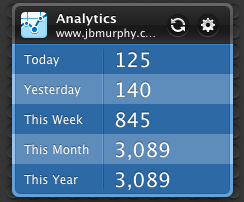
    I had a goal last year, a goal of blogging 2 times a week for the entire year. I ended up with 116 posts. A couple of those posts were a few dates late, so I did not meet my exact goal of 2 times week, but I always managed 4 posts in every two weeks. My year end results are 16,368 visits and 14,067 unique visitors. Fun stuff.  I know is it no much, but I see a upward trent in the graph below! Wonder where I will be next year?

    I hope my tech ramblings are useful to the 14,067 people that visited my site.


  • SQL query to find the number of WordPress posts this year!

    I was compiling my year end wrap up (hits, posts, twitter followers), and I realized I did not know how many posts I created this year. I ran the following query again my WordPress database to find out.

    select post_date,post_title from wp_posts where post_type = ‘post’ AND post_status = ‘publish’ AND post_date like ‘%2011-%’;

    My goal was 2 a week for a year. I ended up with 116.

    More on this later.


  • PowerShell script to add Active Setup registry entries

    I am interested in using Active Setup more throughout our environment. The thing I like about Active Setup is that if I screw up, it will only run once and not over and over! Kidding, but the “run one” nature of Active Setup is nice. I wanted a PowerShell function to create Active Setup registry entries, so I can script the updates on multiple machine. Here is that function:

    Function JBMURPHY-AddToActiveSetup {
      Param([parameter(Mandatory = $true)]$ActiveSetupUniqueName,
    	[parameter(Mandatory = $true)]$ActiveSetupStubPath,
    	[parameter(Mandatory = $true)]$ActiveSetupVersion)
      $ParentKey="HKLM:Software\Microsoft\Active Setup\Installed Components"
      $Key=$ParentKey + "\" + $ActiveSetupUniqueName
      # Check for key
      if (!(Test-Path $Key)){
        New-Item -type Directory $($ParentKey + "\" + $ActiveSetupUniqueName)
      }
      else {
        write-host "Key exists"
      }
      Set-ItemProperty $($Key) -name "StubPath" -value $ActiveSetupStubPath
      Set-ItemProperty $($Key) -name "Version" -value $ActiveSetupVersion
    }
    

  • Updated PowerShell to determine if a user is visiting the office

    I made an error. More like an incorrect assumption in this post, specifically this code.:

    Function JBMURPHY-AD-GetHomeSite {
    Param($username=$(cat env:username))
    foreach ($group in "OfficeGroup1","OfficeGroup2","OfficeGroup3") {
        foreach ($user in $(Get-ADGroupMember $group)){
        if ($user.SamAccountName -eq $username) {return $group}
        }
    }
    }
    

    My incorrect assumption was that the AD PowerShell components were installed on every machine (they are only my machine). I needed to rewire this code above to use ADSI, since Get-ADGroupMember is not on everyone’s machine. Below is that code:

    Function JBMURPHY-AD-GetHomeSite {
    Param($username=$($env:USERNAME))
    $groups=([AdsiSearcher]"samaccountname=$username").Findone().properties.memberof | % {([adsi]"LDAP://$_").cn}
    foreach ($officegroup in "OfficeGroup2","OfficeGroup2","OfficeGroup3") {
        foreach ($group in $groups){
        if ($group -eq $officegroup) {return $group}
        }
    }
    }