
• Retention Policies in Exchange 2010

    I have to say that retention policies in Exchange 2010 are a bit confusing. I understand that they are more powerful and it gives users more control in marking items that should not be purged. But, it is just easier in exchange 2003, you can select the folders you want and select “delete immediately”. For users created folders, you select “all other mail folders”
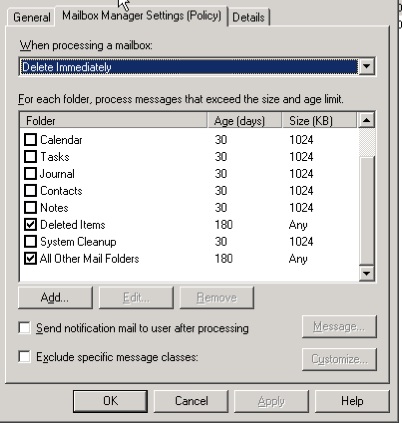
    In 2010, it took me a while to realize that, to create a purge policy that only removed mail items, I needed to create Calendar, Contacts, and Notes policies and “Disable this Tag” .

    Get-RetentionPolicyTag Calendar-NeverDelete | fl Name,MessageClass, RetentionEnabled,Type
    Name             : Calendar-NeverDelete
    MessageClass     : *
    RetentionEnabled : False
    Type             : Calendar

    . . .  and in the gui:
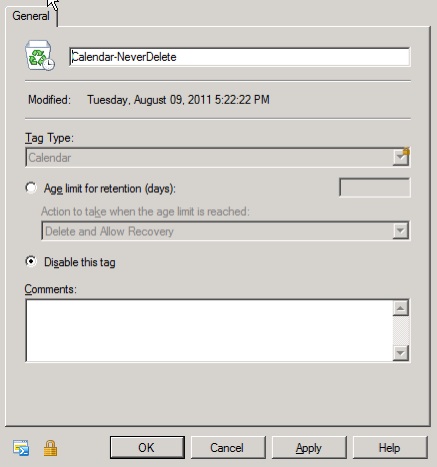
    That seems backwards to me.


  • Scheduled PowerShell script to resume Mailbox Moves (New-MoveRequest)

    Moving mailboxes from 2003 to 2010 is easy, but there is not a “Gui” to schedule it. So I created the following PowerShell script to find all the suspended MoveRequest(s) with the correct date, and resume them.
    MailboxMove.ps1:

    $TodaysDate = (get-date).day.ToString() + (get-date -format MMMM)
    Get-MoveRequest -MoveStatus Suspended | Get-MoveRequestStatistics | Where {$_.BatchName -like "*$TodaysDate*"} | Resume-MoveRequest
    

    Next I create a scheduled task with the following command to run a script with the code above:

    C:\Windows\System32\WindowsPowerShell\v1.0\powershell.exe -command ". 'C:\Program Files\Microsoft\Exchange Server\V14\bin\RemoteExchange.ps1'; Connect-ExchangeServer -auto; c:\Scripts\MailboxMove.ps1"
    

    Now when I create a New-MoveRequest,

    New-MoveRequest -Identity username -TargetDatabase MailboxDatabase02 -BatchName "19August" -BadItemLimit 10 -Suspend
    

    I know that a scheduled task will resume the move a the correct time.

    To monitor progress, I have been using this script:

    Get-MoveRequest  | Get-MoveRequestStatistics | ft -auto alias,Status,TotalMailboxSize,PercentComplete,TargetDatabase,TotalInProgressDuration,BytesTransferred,BatchName
    

  • Force the Light Version of Exchange 2010 OWA on a Cisco ASA WebVPN with SSO

    We have a Cisco ASA in front of our Exchange 2010 OWA application. We needed to create a “bookmark” to point to OWA. Since we are using Forms based authentication, we did not want users to have to re-login after just logging into the ASA. I found this link on how to setup the Bookmark for SSO and Exchange 2010 OWA. We wanted to take it a step further and force the “Light version” of OWA until we could upgrade the ASA code (we are using an older rev and OWA JavaScript is not working correctly). To do this you need to change the “flags” post value to “1”.

    So, to “Force the Light Version of Exchange 2010 OWA on a Cisco ASA WebVPN with SSO” you need to do the following:

    Configuration -> Remote Access VPN -> Clientless SSL VPN Access -> Portal -> Bookmarks -> Add/Edit your Bookmarks
    URL: https :///owa/auth/owaauth.dll

    Advanced Options: Post
    destination : https:///owa/
    flags : 1
    forcedownlevel : 0
    trusted : 0
    username : <yourdomain>\CSCO_WEBVPN_USERNAME
    password : CSCO_WEBVPN_PASSWORD
    SubmitCreds : Login
    isUtf8 : 1


  • Fun with Toshiba IPT 2010 phones and NAT

    We have a Toshiba phone system in our office. I don’t know much about it, because it is run by the very capable @mattsix, but today I jumped and did a little troubleshooting.

    The reoccurring issue we had, was that a remote phone would connect to the IPU, ring, but there would be no audio. We were testing with an Airport Extreme hooked up to a DSL modem and an IPT 201-SD hooked to that.

    First, we found this thread. We checked the “NAT/No Peer to Peer ” settings and they seemed right. Then I cam across this post. Wait, what? There are different types of NAT? I did not know that. As soon as we moved the Airport Extreme out of the mix, and put in a D-Link gaming router, the audio started working.

    I guess the Airport Extreme is using Symmetric NAT and the D-Link is using a more capable NAT.

    Mystery solved? We shall see.

    Update: I found this in the “Starta CIX General Description

    The Strata CIX supports the use of IP telephones that are behind NAT firewalls.

    Symmetric — At this time these routers may cause unreliable service or cause unwanted symptoms. These routers are not compatible with Strata CIX and Strata Net IP configurations


  • Just passed 70-662 : Microsoft Exchange Server 2010, Configuring

    Next up: 70-663


  • BASH script to email if WordPress plugins or themes need updating

    This one took me all day. But I got it. I wanted to have a script that could look through all WordPress sites and find if there are outdated themes or plugins. All I need to do is slap it into a cron job and I am good to go!

    Here is the BASH code to do it.


    UPDATESNEEDED=""
    
    for installpath in $(find /var/www -name wp-config.php)
    do
    cd $(dirname $installpath)
    
    THEMENEEDED=$(php -r 'require_once("./wp-load.php");
    delete_site_transient("update_themes");
    wp_update_themes();
    $new = get_site_transient("update_themes");
    echo count($new->response);')
    
    if [ ! $THEMENEEDED = 0 ]; then
    UPDATESNEEDED="$UPDATESNEEDED \n Site $installpath needs $THEMENEEDED theme(s) updated"
    fi
    
    PLUGSNEEDED=$(php -r 'require_once("./wp-load.php");
    delete_site_transient("update_plugins");
    wp_update_plugins();
    $new = get_site_transient("update_plugins");
    echo count($new->response);')
    
    if [ ! $PLUGSNEEDED = 0 ]; then
    UPDATESNEEDED="$UPDATESNEEDED \n Site $installpath needs $PLUGSNEEDED plugin(s) updated"
    fi
    done
    
    if [ -n "$UPDATESNEEDED" ]; then
    echo -e "$UPDATESNEEDED" | mail -s "Updates are needed" [email protected]
    fi
    

    I have been needing this script for a while.


  • 2000 visitors in 1 month. Nice!

    20110801-084219.jpg


  • How the cloud failed me.

    We host our Linux boxes on Rackspace’s Cloud Server platform. We pay extra per month to use their Redhat Linux images. In return we receive all our patches and updates through Rackspace’s RHN Satellite server. Our thinking was that, we could purchase a Redhat support contract, and  since we were running Redhat we would have OS/Application support if needed.

    We were every happy with the service until the cloud failed me.

    It all started when the new WordPress 3.2 required PHP 5.2.4 or higher. Redhat 5.5 only shipped with 5.1.x. I needed to update my Redhat VMs to 5.6 as Redhat 5.6 had PHP 5.3.x. BUT. Rackspace decided not to deploy 5.6. They said it is coming, but weeks later I still can’t access it.

    They suggested I go to a non supported repo and install it from there. But that defeats the whole purpose of using Redhat on their VMs – I would not have a support path – Redhat would not support a package that was not in their repo (understandably).

    I was forced to buy Redhat support contracts for my servers. Now, we are paying twice for updates, with a support contract and with Rackspace’s extra cost per VM for running Redhat.

    We have all heard that “forced upgrades” is a downside of cloud services.

    This is the opposite – their cloud service is holding me back.